 AMB Software
Directory Report
Change History
All versions have free upgrades from previous versions
Version 80, March 20, 2026
- Bug fixes
Version 79, January 03, 2026
- Usability
Version 78, November 02, 2025
- Usability
Version 77, October 06, 2025
- File properties shows icon of program associated with extension
Version 76, July 23, 2025
- Fixed crash when comparing directories
Version 75, June 30, 2025
- Images on menus
- Digital Signing moved to SSL
Version 74, March 29, 2024
- Memory optimizations to scan more files
Version 73, November 28, 2023
- Compute a file's MD5 checksum, SHA-1 checksum and SHA-256 checksum
Version 72, July 29, 2023
- Show if an exe or dll is 32 bit or 64 bit
- Refresh individual directories
Version 71, March 25, 2023
- Added selecting duplicate files based on file name length
Version 70, Feb 06, 2023
- Minor enhancements
Version 69, July 03, 2022
- Added case sensitive filtering
Version 68, May 07, 2022
- Find files/directories now has combobox with history
Version 67, Feb 27, 2022
- Bug fixes
Version 66, Aug 22, 2021
- Bug fixes
Version 65, July 8, 2021
- Bug fixes
Version 64, April 5, 2021
- Touch (Sets file's modified date to current date/time)
- Find duplicate name with text: Copy
When you copy/paste a file, Windows creates the new file name 'xxx - Copy.xxx'
Version 63, February 13, 2021
- Minor bug fixes and changes
Version 62, December 25, 2020
- Bug fixes
Version 61, November 21, 2020
- Bug fixes
Version 60, August 30, 2020
- Skip zero size files/directories when searching for duplicates
Version 59, April 23, 2020
- Fixed computation of mp3 attributes
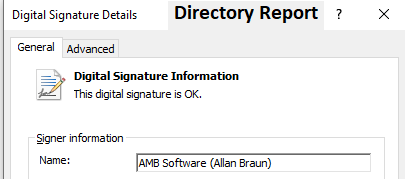
- The executable and installation program are now digitally
signed
So that you can trust that no-one has maliciously altered it
Version 58, February 23, 2020
- Updated Digital Rights Management (DRM)
- Bug fixes
Version 57, September 07, 2019
- Updated Digital Rights Management (DRM)
- Bug fixes
Version 56, August 10, 2019
- Updated Digital Rights Management (DRM)
Version 55, March 31, 2019
- Filter and print if a file/directory is a symbolic link
Features added to version 54, Feb 17, 2019
- Added undo to multiple file rename
Features added to version 53, June 9, 2018
- Added capability to handle files and directories whose total path exceed 260 characters
Features added to version 52, May 13, 2018
- Minor bug fixes
Features added to version 51, March 18, 2018
- Corrected the display of a file's created/accessed/modified time for daylight savings time
Features added to version 50, February 3, 2018
- Improved error messages
Features added to version 49, October 14, 2017
- Updated Digital Rights Management (DRM)
Features added to version 48, July 25, 2017
- Minor bug fixes
Features added to version 47, May 13, 2017
- Fixed getting MP3 attributes which are in Unicode
Features added to version 46, March 18, 2017
- Minor bug fixes
Features added to version 45, October 5, 2016
- Instead of only printing all pages of a report, you can select a range of pages
Features added to version 44, June 14, 2015
- New install
- Fixed bug with files whose path exceeds 240 characters
Features added to version 43, March 22, 2015
- New 64 bit version can scan unlimited number of files
Features added to version 42, December 12, 2014
- Digital Rights Management (DRM) switched from Digital River to FastSpring
- If you purchased an earlier version, please email me with the
email and the name you used to make your purchase
I will email you a coupon for a free upgrade - Bug fix
Features added to version 41, October 5, 2014
- Read the properties of XML based office documents
Features added to version 40, January 6, 2014
- Improved Digital Rights Management
- Progress bar shown when calculating CRC for files over 1 gig
Features added to version 39.1, August 30, 2013
- Digital Rights Management (DRM) switched from Softwrap to Digital River
- If you purchased an earlier version, please email me with the
email and the name you used to make your purchase
I will email you a coupon for a free upgrade - Multiple disks/folders can be selected when browsing for root folders
Features added to version 38, May 27, 2013
- Bug fix
Features added to version 37.1, December 2, 2012
- Bug fix
Features added to version 36, July 8, 2012
- Hidden files may be found when run as an administrator
Features added to version 35, April 14, 2012
- Largest type (File Extensions) window
Features added to version 34, Dec 2, 2010
- Print/save MS-Office properties
- Duplicate files/directories screen is easier to use (blank lines between each group)
Features added to version 33, April 11, 2009
- Bug fixes
Features added to version 32, Nov 11, 2008
- Fixed Directory's "CRC with sub"
- Size in KB/Meg/Gig is no longer rounded up
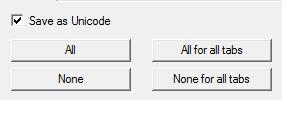
- Full Unicode support
You can now view file/directory names in foreign character sets
The default display font is: Arial Unicode MS
You can change the font of all screens
Features added to version 31.1, September 1, 2008
- Show size in gigabytes
Features added to version 31, May 5, 2008
- Finding duplicate files by comparing byte-by-byte is 33% faster
- CRC's can be preloaded from a file
Features added to version 30, January 13, 2008
- All screens can link a file (createhardlink)
This will create a new directory entry but will not copy the contents of the file - Use a file's link count as a filter
- Use a list of files as a duplicate file filter
Thus only files which are duplicates of the filter files will be displayed
This saves you from finding all duplicates of an entire disk
Features added to version 29, November 4, 2007
- All screens can be sent to the clipboard or Excel program
- Multiple file renaming can put the file number at the start of the file
Features added to version 28, August 2, 2007
- Find and replace duplicate files by comparing byte by byte
- Finding duplicate files is faster
- Find and replace duplicate directories based on:
Size with subdirectories
CRC with subdirectories
Total files with subdirectories - Use your own diff program instead of the one provided by Directory Report
- Column headers icons show how data is sorted
Features added to version 27, March 15, 2007
- Save to XML file
- All screens display much faster (Especially when displaying thousands of files)
Features added to version 26, October 3, 2006
- Additional autoprint features
- One time only warnings to help in printing, duplicate files, duplicate directories and comparing directories
Features added to version 25, May 1, 2006
- Smaller memory used raises the maximum files that can be scanned from 1.5 million files to over 9 million files
- New directory depth option
- New file version column
- New user defined header that appears on top of each page of all reports
- New multiple file rename string substitution
- New multiple file change date - date copying
- All screens can be automatically printed after scanning
- New option to exit after auto print is finished
- Fixed font sizing problem
- Improved auto selecting duplicate files / directories dialog
Features added to version 24, September 20, 2005
- Duplicate files displayed in color
- Duplicate directories displayed in color
- New dialog to select which duplicate files / directories to keep
- More filters based on file attributes
- File rename based on MP3 tags
- View / print new MP3 tags
- Edit old MP3 tags
- Smaller memory used resulting in faster scans
- Faster search for duplicates based on name
Features added to version 23, September 24, 2004
- Finds encrypted files and directories
- Finds protected directories
- Finds duplicate directories
- Finding duplicate files is faster
Features added to version 22
- Multiple file change owner
Features added to version 21
- GUI is easier to use - less clicking
- Last 8 directories and filters are shown - Less clicking
- New auto-find duplicates
This will automatically search for duplicates after scanning the directories
Menu: File / Auto Find Duplicates - Sort bug is fixed - No sorting done from the menu when the tree-control has the focus
Features added to version 20
- Version information print flags are off by default
- Rather than retrieving version information from all files
You can select version information filters (IE: *.exe, *.dll)
Features added to version 19
- Detailed help file
- Size can be displayed in bytes, kilobytes or megabytes
- New auto print feature
This will automatically print to a file after the scan is finished
Features added to version 18.1
- Fixed bug when printing version information that spans two pages
Features added to version 18
- Checking for NTFS Streams is optional (This makes scanning twice as fast)
- When printing to HTML, you can print the file/directory as a hyperlink
- Numbering is optional when renaming multiple files
Features added to version 17.3
- Fixes install problem with Windows ME
- Fixes DLL load problem with SHGetSpecialFolderPath
Features added to version 17
- Three file compare modes made clearer
- Getting file's owner is faster
Features added to version 16
- Prints to .html file for all screens
- Added "SendTo" to all popup menus
- Dropped "1." from version number
- Fixed loading saved fonts from settings file
- Fixed crash when clicking on print preview's scrollbar
Features added to version 1.15
- Prints AVI, MSI and MSM properties
- Modify dates by relative or absolute dates
- Sort order of tree control now matches sort order of right hand window
- Fixed bug of missing OLEACC.DLL
Features added to version 1.14
- Load/Save more settings to a file
- Built with latest Microsoft Visual Studio 7.0
- New print option to print file's creation/access/modification time
- Run from DOS command prompt with settings file
(full path of wDirReport.exe and settings file must be enclosed in double quotes)
Features added to version 1.13
- Load/Save all settings to a file
- Simpler setting of printing flags
- New flags to print/not-print each MP3, WAV and Version property
- Simpler Excel reports for MP3, WAV and Version properties
- Simpler viewing of MP3 properties
- Displays more MP3 properties (length in hh:mm:ss, Stereo mode, ...)
- Displays progress when printing file properties
- Fixed bug when printing sound/video properties to Excel
- Fixed bug when setting printing column width
Features added to version 1.12
- Multiple directories can be renamed
- More multi-rename capabilities
Features added to version 1.11
- All windows can show the file's owner
- All windows can be sorted by their file owner
- The file's owner can be printed in all reports
- You can calculate the size of all files by their owner
Features added to version 1.10
- Two comparison modes: Binary and Ascii.
Binary mode compares each file byte by byte and reports the byte at which files differ.
ASCII mode disregards leading/trailing white space and reports the line at which the files differ. - You can customize the width of all printed columns.
- You can select a new font for printing.
- When you change the date of a directory, you are prompted if you want to change the date of all its files and subdirectories.
- The read-only attribute of files and directories can be changed.
- When you change the read-only attribute of a directory, you are prompted if you want to change the read-only attribute of all its files and subdirectories.
- The directory comparison screen has more commands to greatly ease directory synchronization.
- You can choose to print only directory information - no file information
- The version information of Sybase 12 DLLs can be printed
- The bug of the toolbar going black has been fixed
- Directories can be created
Features added to version 1.9
- Directory compare
- File compare
- Bulk copying (Copy_to)